
School Boxes



Full-Color Printing

3D Design Tool


Overview
Promote Your School Spirit With Custom School Boxes
School events and activities are great in fostering a sense of school pride and camaraderie. But if you truly want to make a lasting impression on the whole student body, the best way is to make these events extra special by giving away custom school boxes that contain tokens or items that they can use or keep forever.
A Box for Different Occasions
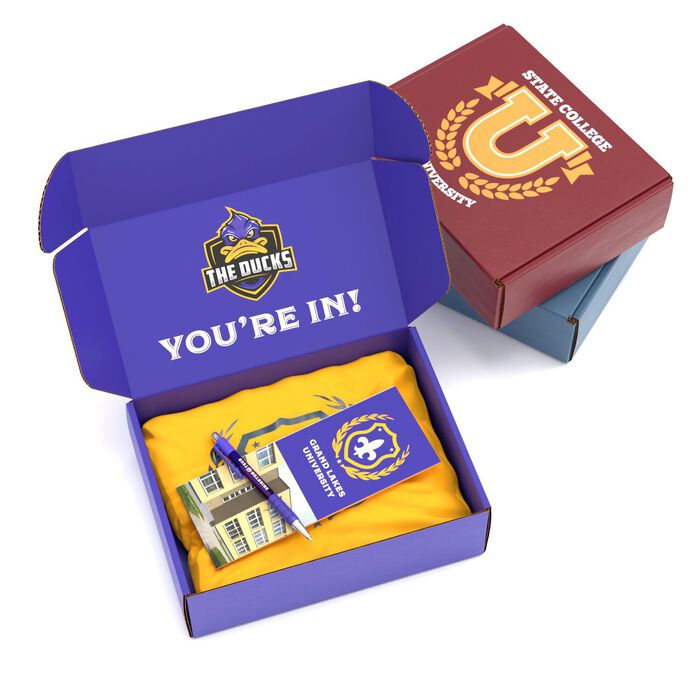
Custom school boxes are perfect for any occasion or school activity. From size to design, you can easily personalize these boxes so they match the overall theme of the event as well as accommodate the things that you want to store in them.
Welcome Kits
For new or returning students alike, give them a warm welcome with back-to-school boxes or welcome kits. These boxes may contain several handy items that are used for studying, such as custom pens, notebooks, sticky notes, and more. If you want to provide an unforgettable unboxing experience while promoting school spirit, make sure the design incorporates your school colors or insignia.
Prom Boxes
Prom is probably one of the school events that students look forward to the most, so why not bring it to the safety and comfort of their homes? Send them prom boxes filled with various items like tumblers, cosmetics and grooming kits, custom buttons or keychains, personalized accessories, and even food or snacks.
Graduation Boxes
Go all out in promoting school pride in your graduation boxes. Design the boxes from top to bottom with your school logo, colors, motto, and even the school mascot. You can even add a congratulatory message on these custom school boxes to show your support for their achievement and hard work over the years. If you want to make sure your students will always remember their alma mater, use graduation boxes to send them class photos, school shirts or hoodies, and other souvenirs that they can take with them wherever they go.
Full School Box Specifications
| Interior Dimensions | Customize based on the following ranges:
|
|
Material |
Corrugated Cardboard
|
|
Printed Sides |
|
|
Quantity |
|
|
Turnaround Time |
|
How to Design Your Custom School Boxes
Here at Packola, you can create the design of your custom school boxes without exiting the website. Here’s a helpful step-by-step guide:
Step 1. Click Design Your Mailer Box Online. Right after configuring the specifications of your boxes, you can go directly to our online 3D design tool and start personalizing the design of your school boxes.
Step 2. Insert your school logo or other images. You may opt to start by inserting your school logo or other images on the design of your custom boxes. Once you have uploaded the files and you can see them on the 3D design tool, you can crop, resize, and reposition the images.
Step 3. Modify other graphic elements. If you want to add more shapes, lines, or patterns to your custom school boxes, you can do that by clicking the Add Shapes or Lines option found on the left panel of the screen. You can also change the background color to make sure that it matches your school colors or the theme of the occasion.
Step 4. Double check the specs of your boxes. You can check the specifications of your custom boxes for the last time or modify the size, material, printed sides, and more straight from the online 3D design tool. Just click on the Modify the Box Specs option on the left panel.
Step 5. Save Project or Add to Cart. Once you are satisfied with your design, you can proceed to placing your order by clicking Add to Cart. But if you still need more time, simply save your project and retrieve it later.
Get Your Free Dieline Templates from Packola
If you are a graphic designer or know someone who can design your custom school boxes for you, you might prefer to use other professional design applications such as Adobe Photoshop or Illustrator. We can make the job easier for you by sending you a dieline template of our boxes. Just click on Order Now and Receive a Dieline Template below the built-in price calculator on our website.
Frequently Asked Questions
Shipping boxes are larger and used for bulky items, while mailer boxes are smaller and designed for individual or small items. Mailer boxes are ideal for e-commerce and don’t require adhesives for assembly.
Packola measures the interior dimensions for box production, meaning the sizes you input are the measurements inside the box when it is folded. You can follow these steps to help gauge the box measurements you need:
- Lay out and organize all the items you plan to put inside your box on a flat surface.
- Stack them as you would when packing the box.
- Include any decorative packaging material, such as bubble wrap or packaging foam.
- Measure the dimensions accordingly in inches
- The length should be the left-to-right dimension
- The width is the front-to-back dimension
- The depth/height is from the flat surface to the top of the tallest item
- Add a 0.25" margin to each dimension to ensure easy packaging
Our corrugated boxes have a 32 ECT rating. Boxes with 32 ECT rating usually support the following weights:
- E-flute: up to ~20-25 lbs
- B-flute: up to ~30-40 lbs
Yes. The mailer box ships flat and pre-scored. Follow the steps in the video to quickly assemble your custom box:
Yes, you can order one (1) mailer box. We have no minimum quantity order. You can order as few or as many as you need.
Yes, you can. The corrugated cardboard is strong enough to withstand the rigors of shipping. However, we recommend using external packaging such as a shipping box to provide a better unboxing experience.
We have an Online Design Studio that makes it super easy to add logo, text, and graphics to your box within minutes. You can also use a professional desktop application like Adobe Illustrator® and send us the completed artwork. Already have a file but have questions about your design? Email our packaging experts at artwork@packola.com for a review.
After completing your order, we’ll send you the dieline template file through your given email address.
The QR code makes it easier for us to track your orders while it’s in production. This means we get to finish it faster so you can receive it as early as possible. It won’t affect the overall look of your custom box since it’s printed on a hidden area.


Your boxes will be shipped flat and unassembled.